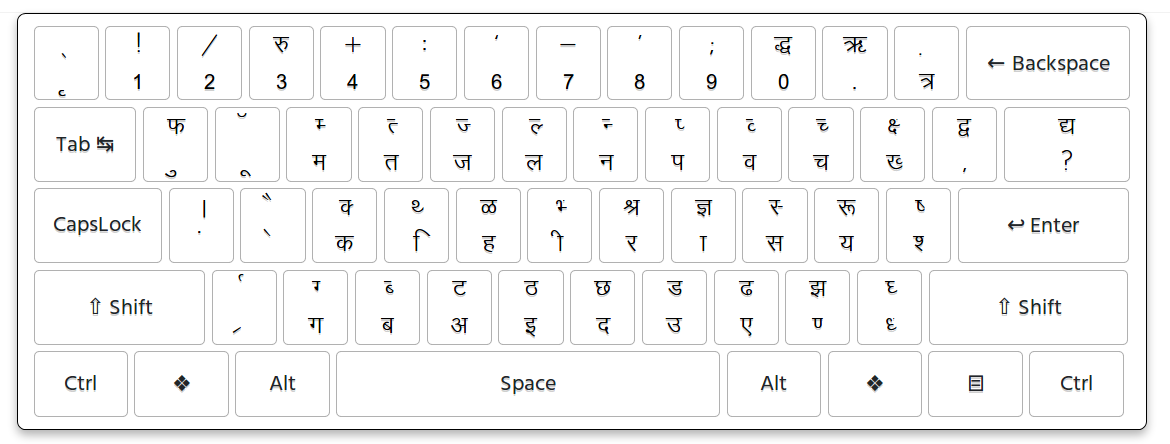
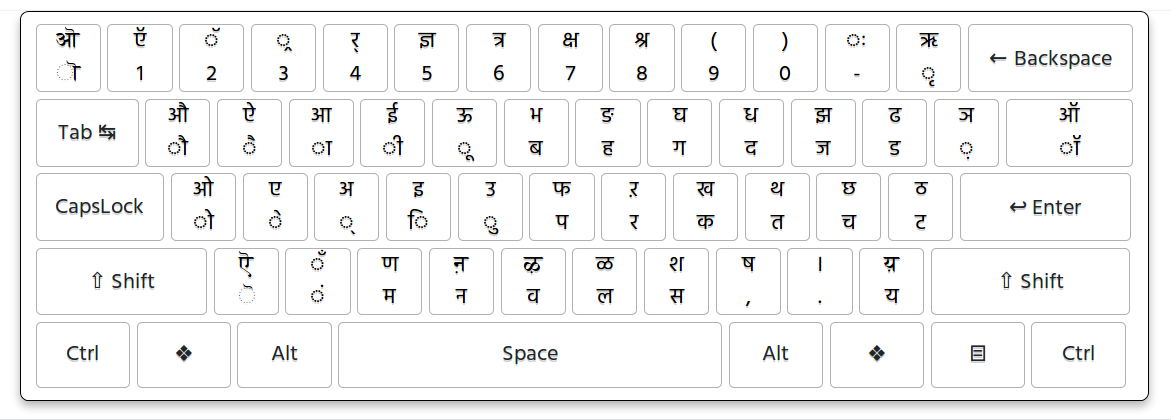
Krutidev to Unicode Converter
Convert Krutidev to Unicode online with our free Hindi font converter. Easily convert old Krutidev Hindi text into Unicode Hindi text that works with modern computers, mobile phones, websites, Microsoft Word, Excel, government portals, and other digital applications. You can also use this tool as a Krutidev to Mangal converter because Mangal is a Unicode-based Devanagari font widely used for Hindi text.
What Is Krutidev to Unicode Conversion?
Krutidev to Unicode conversion means converting Hindi text written using the legacy Krutidev font encoding into Unicode-compatible Hindi text.
Krutidev has been widely used for Hindi typing in India, particularly in government offices, typing institutes, printing businesses, competitive examinations, and older computer systems. Many documents created years ago still contain Hindi text in Krutidev format.
The main problem is that Krutidev is a legacy font-based typing system and does not use the modern Unicode character encoding system. As a result, text copied from a Krutidev document may not display correctly when pasted into a modern application or opened on another computer.
Unicode solves this problem by representing characters using standardized character codes. Unicode Hindi text can be displayed across different operating systems, browsers, mobile devices, and applications when an appropriate Devanagari font is available.
Our Krutidev to Unicode Hindi font converter helps transform legacy Krutidev text into Unicode Hindi text so that it can be used in modern digital environments.
Krutidev to Mangal Converter
The terms Krutidev to Unicode and Krutidev to Mangal are often used interchangeably by Hindi users, but they technically refer to different things.
Unicode is a character encoding standard, while Mangal is a Unicode-based Devanagari font. When you convert Krutidev text into Unicode, the resulting Hindi text can be displayed using fonts such as Mangal and other Unicode-compatible Devanagari fonts.
A Krutidev to Mangal converter is therefore useful when you have old Hindi content typed in Krutidev and want to use it in modern applications such as Microsoft Word, Excel, Google Docs, websites, government forms, email, and mobile applications.
- Microsoft Word
- Microsoft Excel
- Microsoft PowerPoint
- Google Docs
- Google Sheets
- Websites and blogs
- Online government forms
- PDF creation tools
- Social media
- Mobile applications
Why Convert Krutidev to Unicode?
There are several important reasons to convert old Krutidev Hindi text into Unicode. Unicode text is easier to use, search, share, edit, and process in modern digital applications.
Better Compatibility
Unicode Hindi text is designed to work across modern digital platforms. You can copy Unicode text from one application and paste it into another without depending on a particular legacy font encoding.
Use Hindi Text on Mobile Phones
Unicode has made Hindi text much easier to use on Android and iPhone devices. Modern mobile operating systems support Unicode Devanagari text, allowing Hindi content to be displayed without installing an old-style Krutidev font.
Government Forms and Online Services
Many government websites and online services use Unicode for Indian-language text. If you have information stored in Krutidev, you may need to convert it before entering it into an online form.
Searchable Hindi Text
Unicode text can be indexed and processed by modern search engines and software. This is particularly important if you publish Hindi content on a website.
Easy Copy and Paste
One of the biggest advantages of Unicode Hindi is portability. You can copy Unicode text from Microsoft Word, Google Docs, a website, or another application and paste it into another Unicode-compatible application.
Better Accessibility
Unicode text can be processed by modern software, search systems, and assistive technologies. This makes standardized text more suitable for modern digital environments.
Future Compatibility
Converting important Hindi documents from Krutidev to Unicode helps preserve the actual text in a modern and standardized format, making the content easier to reuse as software and operating systems change.
How to Convert Krutidev to Unicode Online
Using an online Krutidev to Unicode converter is simple. You do not need to manually replace individual characters. Follow these steps to convert your Hindi text.
Step 1: Copy Your Krutidev Text
Open the document containing your Krutidev Hindi text. Select the text you want to convert and copy it. You can copy text from an old Word document, text file, website, or another application where Krutidev is being used.
Step 2: Paste the Text into the Converter
Paste your Krutidev text into the input box of the converter. Make sure that the original text is actually written using Krutidev. Text created with another legacy Hindi font may require a different conversion method.
Step 3: Convert Krutidev to Unicode
Click the Convert button. The converter processes the Krutidev character mapping and generates the corresponding Unicode Hindi text.
Step 4: Copy the Unicode Text
Once the conversion is complete, review the output and copy the Unicode Hindi text. You can paste it into Word, Excel, Google Docs, an online form, website content, email, or another Unicode compatible application.
Step 5: Download or Save Your Text
If a download option is available, you can save the converted content for future use. This can be particularly useful when converting large amounts of Hindi text.
Kruti Dev to Unicode Hindi Font Converter
A Kruti Dev to Unicode Hindi font converter is useful when you have Hindi text that was originally typed using the Krutidev legacy font system.
Many users search for this tool using different spellings and phrases. These searches generally describe the same requirement: converting Hindi text from the Krutidev legacy format into Unicode-compatible Hindi text.
Common searches:
Who Can Use a Krutidev to Unicode Converter?
Government Employees
Government departments have accumulated a large amount of Hindi documentation over the years. Employees may need to convert older Krutidev documents before using their content in newer systems.
Students
Students may receive old Hindi notes, assignments, question papers, or study material created using Krutidev. Converting the content to Unicode makes it easier to edit and reuse.
Hindi Typists
Hindi typing professionals who regularly work with legacy documents can use a converter to move text from Krutidev-based documents into modern Unicode applications.
Writers and Content Creators
Hindi writers can convert old content before publishing it on websites, blogs, digital publications, and social media.
Data Entry Operators
Data entry professionals often work with information collected from different sources. A Unicode converter makes it easier to standardize Hindi text before entering it into modern databases and applications.
Advantages of Using an Online Krutidev Converter
- No manual character replacement is required.
- Works directly in a modern web browser.
- Useful for converting old Hindi text.
- Unicode text can be copied and pasted easily.
- Converted text can be used in Word and Excel.
- Useful for Hindi government forms and online services.
- Can be used on desktop and mobile devices.
- Helps modernize old Hindi documents.
- Useful for website and Hindi content publishing.
- Makes legacy Hindi text easier to reuse.
Krutidev and Unicode: What Is the Difference?
Krutidev and Unicode are not the same thing. Krutidev is a legacy Hindi typing and font system, while Unicode is a standardized character encoding system used to represent text across modern digital systems.
With legacy font-based text, the appearance of characters depends heavily on the font and character mapping being used. Unicode separates the underlying characters from the visual font used to display them.
This is why Unicode Hindi text is generally more suitable for websites, modern applications, mobile devices, search systems, and digital document workflows.
Can Converted Unicode Text Be Used in Word and Excel?
Yes. Unicode Hindi text can generally be copied and pasted into applications such as Microsoft Word and Microsoft Excel. You can also use Unicode Hindi text in Google Docs, Google Sheets, email, browsers, content management systems, and other applications that support Devanagari text.
After conversion, you can select a suitable Unicode Devanagari font, such as Mangal or another font that supports Hindi characters, depending on your application and operating system.
Can I Use Krutidev to Unicode Converter on Mobile?
Yes. An online Krutidev to Unicode converter can be used from a modern Android or iOS browser. You can copy Krutidev text from a supported source, paste it into the converter, convert it, and then copy the Unicode Hindi output.
This is useful when you need to convert Hindi text but do not have access to a desktop computer or do not want to install additional software.
Tips for Getting Accurate Conversion Results
- Make sure the original text is actually typed in Krutidev.
- Copy the complete text before starting the conversion.
- Avoid changing characters in the input before conversion.
- Review the converted output after conversion.
- Check names, numbers, punctuation, and special characters carefully.
- For important official documents, proofread the converted text.
- Use a Unicode-compatible Devanagari font when displaying the output.
Frequently Asked Questions About Krutidev to Unicode
1. What is Krutidev?
Krutidev is a legacy Hindi typing and font system that has been widely used in India for Hindi typing, government work, printing, competitive examinations, and data entry. Many older Hindi documents still contain text created using Krutidev.
2. What is Unicode?
Unicode is a standardized character encoding system that allows text from different writing systems to be represented consistently across modern computers, mobile devices, applications, and websites.
3. What is a Krutidev to Unicode converter?
A Krutidev to Unicode converter changes Hindi text written using the Krutidev legacy character mapping into Unicode-compatible Hindi text. This makes the converted text easier to use in modern applications.
4. Is Krutidev to Mangal the same as Krutidev to Unicode?
They are closely related but technically different. Unicode is a character encoding standard, while Mangal is a Unicode-based Devanagari font. Converting Krutidev text to Unicode allows it to be displayed using fonts such as Mangal.
5. Can I convert Krutidev to Unicode online?
Yes. You can use an online Krutidev to Unicode converter by pasting your Krutidev Hindi text into the input area and converting it into Unicode Hindi text.
6. Can I use the converted text in Microsoft Word?
Yes. Unicode Hindi text can generally be copied into Microsoft Word and other modern word-processing applications. You can select a Unicode-compatible Devanagari font for displaying the text.
7. Can I use the converter on a mobile phone?
Yes. You can use the online converter from a modern Android or iOS browser. No separate desktop software is required for the online conversion process.
8. Can converted Unicode Hindi text be used in government forms?
Unicode Hindi text is commonly used by modern digital systems and online services. However, the exact requirements can vary by individual government portal, so you should follow the instructions provided by the specific website or department.
9. Does Krutidev to Unicode conversion change the meaning of the text?
The purpose of conversion is to change the character representation from the Krutidev mapping to Unicode text. It does not intentionally translate the Hindi content or change its meaning. Nevertheless, you should review the output for unusual characters, special symbols, or complex legacy combinations.
10. Is the Krutidev to Unicode conversion always 100% accurate?
The converter can accurately handle many commonly used Krutidev characters and combinations. However, unusual symbols, complex combinations, corrupted source text, or text created using a different legacy Hindi font may require manual correction.
11. Can I convert a large amount of Krutidev text?
The amount of text that can be converted depends on the converter and browser. For very large documents, converting the content in smaller sections can make the process easier and help you review the output.
12. Why does my converted text look incorrect?
Incorrect output can occur if the original text was not created using Krutidev, if the source text is corrupted, or if it contains unsupported legacy characters. Check the original font and review the converted output carefully.
Convert Krutidev to Unicode Online
Converting old Krutidev Hindi text to Unicode makes your content easier to use with modern computers, mobile devices, websites, documents, and online services. Whether you are a Hindi typist, student, government employee, data entry operator, writer, or someone working with an old Hindi document, a Krutidev to Unicode converter can help you quickly convert legacy Hindi text into a modern Unicode-compatible format.